
Why Build a Comparison Site?
Before you invest time, understand why comparison sites work in dating.
The Market Problem
When someone decides to try online dating, they face analysis paralysis. There are 100+ dating apps. Which one is right for them?
- Young people want swiping and casual dating
- Professionals want vetted, serious connections
- Over-50 crowd wants simplicity and safety
- LGBTQ+ users want inclusive communities
No single app is best for everyone.
The Solution You Provide
A comparison site becomes the trusted authority. You answer:
- Which app for my situation?
- How do I compare app X vs Y?
- What are the costs?
- Is it safe?
- How many people use it?
Users love comparison sites because they save time. You love them because they monetize beautifully.
The Business Model
- Month 0-3: Build site (free, just your time)
- Month 3-6: Get organic traffic (free traffic, ads cost $1-2K to accelerate)
- Month 6-12: Scale with paid ads ($3-5K spend, $8-15K income)
- Year 2+: Largely passive ($5K+ monthly revenue, minimal ongoing work)
Why This Works Better Than Content Farms
Sites with 500+ random articles perform poorly. Sites with 50 laser-focused articles on dating comparison perform great because:
- Clear topic authority (you're the expert in dating apps)
- Topical clustering (related content supports each other)
- Internal linking value (users navigate logically)
- Higher conversion (focused audience, relevant offers)
- Easier to maintain (fewer, better articles beat more, mediocre ones)
Domain and Hosting Setup
Choosing Your Domain
Your domain should:
- Be memorable
- Contain relevant keywords (if possible, not required)
- Be available as .com (preferred) or .co/.io (secondary)
- Not be too long (under 15 characters ideal)
Examples of good dating comparison domains:
- DatingAppCompare.com
- WhichDatingApp.com
- DatingAppReviews.com
- BestDatingAppGuide.com
- DatingPlatformCompare.com
- DateAppVsApp.com
- FindYourMatch.co
Examples of bad domains:
- BestDatingAppsComparisonGuide2026.com (too long)
- DatingAppComparator123.com (awkward)
- RandomDatingBlog.com (no keyword value)
Cost: $10-15/year for domain registration (Namecheap, GoDaddy, Google Domains)
Where to buy: Namecheap is simplest for beginners. Avoid GoDaddy's upselling.
Choosing Hosting
You need a web host to run your site. Options:
Shared Hosting (Recommended for beginners):
- Cost: $5-15/month
- Setup: Very easy
- Performance: Good for 0-50K monthly visitors
- Providers: Bluehost, SiteGround, Kinsta
Best choice for dating affiliate sites: Kinsta
- Cost: $35/month minimum
- Setup: Medium
- Performance: Excellent
- Support: Excellent
- Perfect for WordPress
Budget choice: SiteGround
- Cost: $3-7/month starter
- Setup: Very easy
- Performance: Good
- Support: Good
- Recommended for true beginners
Bundling Domain + Hosting
Some hosts offer bundles (domain + hosting). This is often a slight discount but adds commitment. Separate is more flexible.
Recommended path:
- Buy domain from Namecheap ($12/year)
- Buy hosting from Kinsta ($35/month) or SiteGround ($5/month)
- Point domain to hosting (both have easy instructions)
Cost setup: $140-420 first year (domain + 12 months hosting)
WordPress Installation and Theme
Installing WordPress
Most hosts offer 1-click WordPress installation.
- Log into hosting control panel
- Find "Install Applications" or "1-Click Installs"
- Select WordPress
- Choose domain
- Set admin username and password
- Install
Takes 5 minutes.
Cost: Free (included with hosting)
Choosing a WordPress Theme
A theme controls your site's design. Dating comparison sites need:
- Clean, simple design (not distracting)
- Easy comparison table support
- Mobile-responsive (critical)
- Fast loading
- Good for affiliate sites
Recommended themes:
- Neve (Free)
- Clean, fast, simple
- Good comparison table support
- Perfect for beginners
- Cost: Free
- Astra (Free + paid options)
- Highly customizable
- Great for affiliate sites
- Excellent documentation
- Cost: Free (paid addons $49+/year optional)
- OceanWP (Free + paid)
- Beautiful design
- Good for comparison sites
- Cost: Free (premium $99/year optional)
My recommendation: Astra free version. It's powerful, flexible, and beginner-friendly.
Essential WordPress Plugins
Plugins extend WordPress functionality. Key plugins for dating comparison sites:
SEO:
- Yoast SEO (Free) - Essential for SEO optimization
- RankMath (Free + paid) - More modern alternative to Yoast
Performance:
- WP Super Cache (Free) - Makes site load faster
- Imagify (Free) - Compresses images automatically
- Cloudflare (Free) - CDN for faster global loading
Affiliate Links:
- ThirstyAffiliates (Free) - Manages affiliate links cleanly
- Pretty Links (Free) - Link cloaking and tracking
Comparison Tables:
- TablePress (Free) - Creates and manages comparison tables easily
- Easy Comparison Tables (Free) - Simpler alternative
Forms and Signups:
- WPForms (Free) - Simple email signup forms
- Mailchimp (Free) - Email list management
Analytics:
- MonsterInsights (Free) - Google Analytics integration
Core essentials (install these first):
- Yoast SEO
- WP Super Cache
- ThirstyAffiliates
- TablePress
- WPForms
Cost: All free versions are available. Paid upgrades optional ($300-500/year if upgrading all).
Site Structure and Navigation
Homepage Structure
Your homepage should:
- Clearly explain what you do (dating comparison)
- Display your featured comparisons
- Show your most popular guides
- Have email signup
- Display trust signals (Updated dates, experience, credentials)
Suggested homepage layout:
``` Header: Navigation menu Hero Section: "Find Your Perfect Dating App" Subheader: "Detailed comparisons of 50+ apps"
Section 1: Featured Comparisons (3-5 cards linking to comparison pages)
- Best Overall Dating Apps
- Best for Serious Relationships
- Best Free Dating Apps
- Best for Over 50
Section 2: Email Signup "Get weekly dating tips"
Section 3: Popular Guides (4-6 cards)
- How to Write a Dating Profile
- First Date Ideas
- Red Flags in Online Dating
- etc.
Section 4: Site Stats
- 100K+ monthly readers
- 50+ apps compared
- Updated April 2026
Footer: Links to main pages, privacy policy, about ```
Main Navigation Menu
Keep it simple. 5-7 main items:
- Home
- All Apps (links to all comparison pages)
- Guides (links to helpful articles)
- Best Apps (links to featured comparisons)
- Reviews (if you have individual app reviews)
- About (who you are, why you started)
- Contact (email or form)
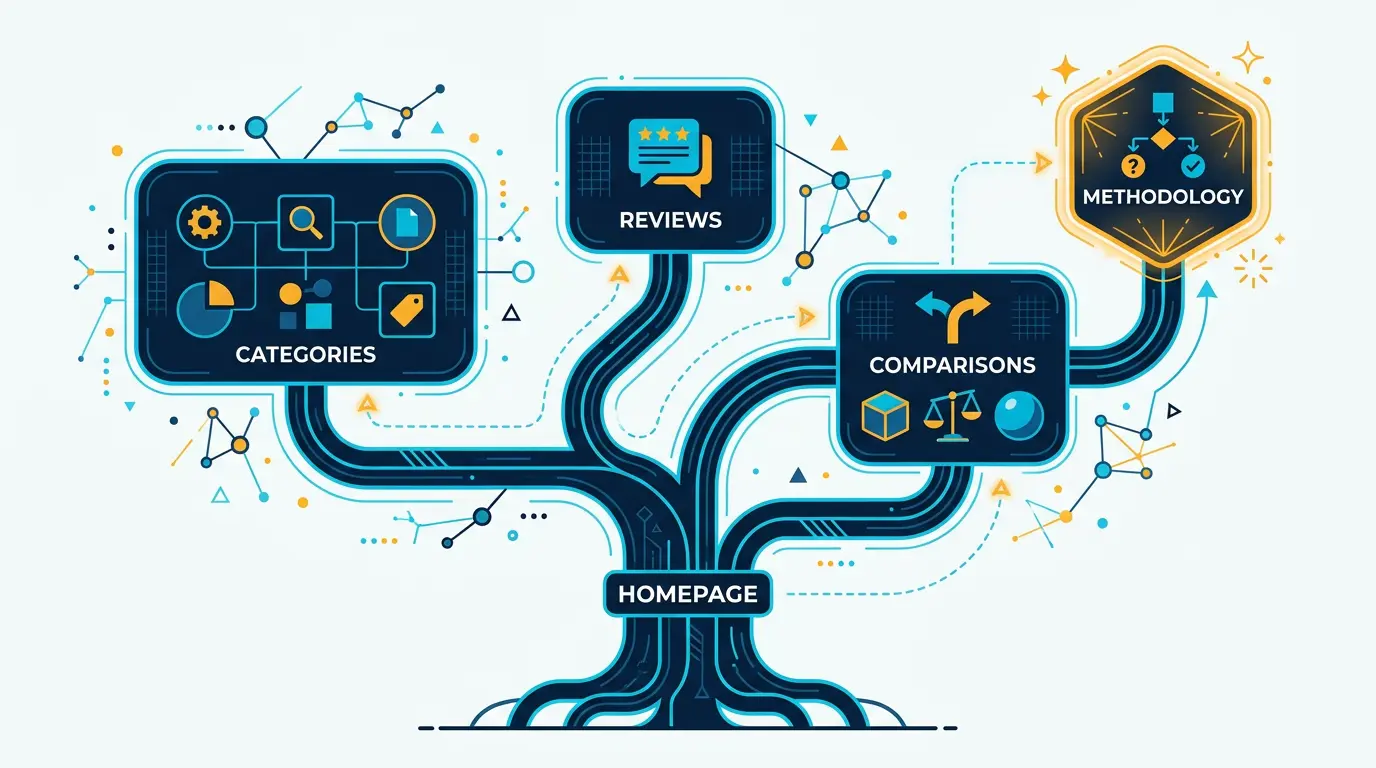
Information Architecture
Organize content into logical clusters:
Cluster 1: Comparison Pages
- Best Dating Apps Overall
- Best Dating Apps by Goal (Casual, Serious, etc.)
- Best Dating Apps by Demographic (Over 50, LGBTQ+, etc.)
- Best Dating Apps by Type (Free, Paid, Apps vs Sites)
Cluster 2: Guides
- Profile creation and optimization
- Safety and security
- Communication tips
- First dates
- Troubleshooting
Cluster 3: App-Specific Reviews
- Individual app reviews
- Competitor comparisons
- Feature breakdowns
Cluster 4: Support
- FAQ
- Glossary
- About
- Contact
Each cluster should interlink naturally.
Creating Comparison Pages
Comparison pages are your core value. They directly monetize.
Comparison Page Template
Structure:
``` Title: Best Dating Apps for [Audience/Goal] Meta: Optimized description mentioning audience
Hero paragraph: Why this comparison matters
Table of contents
Section 1: Quick Comparison Table
- 3-5 top picks side-by-side
- Show: app name, cost, target user, key feature, link
- Make it scannable
Section 2: Detailed Reviews For each app (3-5 apps total):
- App name and image
- Pros (3-4 bullets)
- Cons (3-4 bullets)
- Best for: [Description]
- Cost: [Pricing breakdown]
- User rating/reviews
- Link button (affiliate)
Section 3: Comparison Video (optional)
- Embed YouTube video comparing apps
Section 4: FAQ
- 5-8 questions users ask
- Clear answers
Section 5: Final Recommendation
- "Our pick: [App name] because..."
- Explain your choice
Section 6: Email signup CTA
- "Subscribe for weekly dating tips"
Footer: Updated date, your credentials ```
Content Guidelines
Length: 1500-2500 words (comprehensive but not overwhelming)
Apps to compare: 3-5 apps
- More than 5 dilutes the comparison
- Less than 3 seems incomplete
Honesty: Be balanced
- Every app has pros and cons
- Don't bash one to favor another
- Users detect bias and leave
Structure: Headers and formatting
- Use H2 for each app review
- Use bullets for pros/cons
- Use bold for key features
- Use tables for side-by-sides
Links: Include affiliate links naturally
- Link in section headers
- Include button with "Try Free" or "Sign Up"
- Don't oversell
Images: Use screenshots
- Show the app interface
- Show profile creation process
- Make it visual
Example Comparison Page Outline
Title: Best Dating Apps for Serious Relationships 2026
Opening: "Looking for a real relationship, not casual dating? Here are the 5 best dating apps that attract serious daters and actually lead to lasting connections."
Quick Table:
| App | Cost | Best For | Match Quality | Link |
|---|---|---|---|---|
| Match | $30-40/mo | 45+ serious | Excellent | TRY FREE |
| Hinge | Free-$50/mo | 25-45 serious | Very Good | TRY FREE |
| eHarmony | $60/mo | 35+ marriage-minded | Excellent | TRY FREE |
Detailed Reviews:
1. Match - Best Overall
- 25 years in business
- 40M+ members
- Detailed profiles reduce tire-kickers
- Older user base = more serious
Pros:
- Most established dating platform
- Users are quality and committed
- Advanced filtering options
- Great customer support
Cons:
- Higher price point ($30-40/mo)
- Older user interface
- Slower on swiping (better for profiles)
Best For: People 40-60 seeking serious relationships or marriage
[TRY MATCH FREE BUTTON]
Etc. for 4 more apps...
Creating Guide and Support Content
Guides drive organic traffic and support your comparison pages.
Guide Topics (15-20 posts)
Profile Optimization (3-4 posts):
- "How to Write a Dating Profile That Gets Matches"
- "Best Dating Profile Photos: What Really Works"
- "First Line on Dating Apps: 20 Conversation Starters"
- "Common Dating Profile Mistakes (And How to Fix Them)"
Communication (3-4 posts):
- "How to Start a Conversation on Dating Apps"
- "What to Say When Matching on Tinder/Bumble/etc."
- "When to Move From App to Text/Phone"
- "How to Know if Someone Actually Likes You"
Safety and Red Flags (2-3 posts):
- "Online Dating Safety: 10 Essential Tips"
- "Red Flags in Online Dating Profiles"
- "How to Spot a Scammer on Dating Apps"
First Date (2-3 posts):
- "Best First Date Ideas (From Coffee to Adventure)"
- "What to Talk About on a First Date"
- "First Date Outfit Ideas"
Mindset and Relationship (3-4 posts):
- "Dating After a Breakup: When Are You Ready?"
- "Online Dating for Introverts: A Practical Guide"
- "How Long Should You Message Before Meeting?"
- "Is Online Dating Right for You?"
Guide Page Structure
Each guide should:
- Be 800-1200 words
- Have clear H2 sections (6-8 sections)
- Include actionable tips (not just theory)
- Link naturally to relevant comparison pages
- Include examples or personal stories
- Have a clear takeaway
Linking Guides to Comparison Pages
In each guide, naturally recommend comparison pages.
Example: In "How to Write a Dating Profile," include:
"Different apps attract different types of people. Choose an app aligned with your goal (casual vs serious), then write your profile to appeal to that audience. See our full guide to the best dating apps for serious relationships to choose the right platform."
This drives traffic between your content.
Monetizing With Affiliate Links
Setting Up Affiliate Links
Step 1: Join affiliate programs
!Dating comparison site setup and structure *Recommended site architecture and page structure for a dating comparison affiliate site*
For each dating app/site you review:
- Go to their affiliate or partner program
- Sign up as publisher
- Get your unique affiliate link
Most dating platforms have programs:
- Match has affiliate program (network: CrakRevenue)
- Bumble has affiliate program
- Hinge has affiliate program
- Most major apps do
If direct program unavailable, use:
- CrakRevenue
- TrafficJunky
- Other networks covered in previous articles
Step 2: Use ThirstyAffiliates plugin
Rather than leaving raw affiliate URLs, use ThirstyAffiliates to clean them up.
Example:
- Raw: `https://www.crakrevenue.com?trackingid=12345&app=match`
- Shortened: `yoursite.com/match` (with redirect)
Benefits:
- Cleaner looking
- Easier to track
- Can update links without changing content
- Looks less spammy
Step 3: Placement strategy
Place affiliate links in:
- Comparison tables - Every app should have a "Try Free" button/link
- "Pros" section - Link when mentioning it's worth trying
- Final recommendation - "Try Match Free" button
- Guide articles - "See our guide to serious dating apps"
- Email links - In emails, include app links
Disclosures (Legal Requirement)
You must disclose that you use affiliate links. Use FTC-compliant language:
At top of comparison page: "This page contains affiliate links. We may earn a commission if you sign up through our links at no extra cost to you."
Near links:
- "(affiliate link)" next to buttons
- Or use ThirstyAffiliates disclosure feature
Being transparent actually increases clicks and trust.
Balancing Money and Honesty
Review apps honestly even if you don't get affiliate commission.
- If an app is genuinely good, recommend it even without affiliate link
- If an app is mediocre, say so (users respect honesty)
- Don't include apps just because they pay well
- Your credibility is worth more than individual commissions
Users who trust you convert better and generate more revenue long-term.
Launching Your Site
Pre-Launch Checklist
Design (Week 1):
- Choose and install theme
- Install essential plugins
- Customize colors/branding
- Set up navigation menu
- Create homepage
Content (Weeks 1-2):
- Create 5 comparison pages
- Create 5 guide posts
- Create About page
- Create Privacy Policy (use generator like Termly)
- Create Terms of Service (template available)
SEO (Week 2):
- Set up Yoast/RankMath
- Optimize titles and meta descriptions
- Create XML sitemap
- Set up Google Search Console
- Set up Google Analytics
Monetization (Week 2):
- Join affiliate programs for apps
- Set up ThirstyAffiliates
- Add affiliate links to content
- Add email signup form
- Connect email to Mailchimp or ConvertKit
Testing (Week 3):
- Test all links work
- Test on mobile
- Check page speed
- Check forms submit properly
- Test affiliate tracking
Launch (Week 3-4):
- Make site live (move from staging)
- Submit to Google Search Console
- Submit sitemap
- Email friends and family
- Announce on social media
Soft Launch vs Hard Launch
Soft Launch (Recommended):**
- Make site live but don't promote widely
- Run for 1-2 weeks, fix bugs
- Get feedback from early users
- Then promote
Hard Launch:
- Promote immediately on day 1
- Good if you're confident
- Higher launch visibility
- Risk of bugs becoming public
Recommend soft launch. Test thoroughly, then promote.
Growth Strategy (Months 1-12)
Months 0-3: Build
Focus: Create foundation content
Activities:
- Create 8-10 comparison pages
- Create 15-20 guide posts
- Optimize all pages for SEO
- Build email list (target: 200-500 subscribers)
- Join 5+ affiliate programs
Traffic goal: 100-500 monthly organic visitors
Income goal: $50-200/month
Time investment: 15-20 hours/week
Months 3-6: Optimize and Build Links
Focus: Improve SEO, start getting traffic
Activities:
- Continue creating content (2-3 posts/week)
- Build 5-10 backlinks from dating blogs
- Update and improve existing content
- Start running $500/month in Facebook ads
- Build email list (target: 1000+ subscribers)
Traffic goal: 1000-3000 monthly organic visitors
Income goal: $300-800/month
Time investment: 15-20 hours/week
Months 6-9: Scale Traffic
Focus: Scale both organic and paid
Activities:
- Create 30-40 total comparison pages
- Create 40+ guide posts
- Build 20-30 backlinks
- Scale paid ads to $1500-2000/month
- Grow email list (target: 3000+ subscribers)
- Optimize conversion funnel
Traffic goal: 5000-15000 monthly visitors
Income goal: $1500-5000/month
Time investment: 10-15 hours/week (less per visitor as it scales)
Months 9-12: Establish Authority
Focus: Become recognized authority, build passive income
Activities:
- Maintain content calendar (1-2 posts/week)
- Actively build links (3-5/week)
- Scale profitable paid ads to $3000-5000/month
- Guest post on dating blogs
- Maintain email list engagement
- Build partnerships with complementary sites
Traffic goal: 20000+ monthly visitors
Income goal: $5000-15000/month
Time investment: 5-10 hours/week (mostly passive)
Key Metrics to Track
Create a spreadsheet tracking:
| Month | Organic Visitors | Paid Visitors | Total Visitors | Organic Conv % | Email Subscribers | Monthly Revenue |
|---|---|---|---|---|---|---|
| 1 | 50 | 200 | 250 | 2% | 50 | $50 |
| 3 | 1500 | 1500 | 3000 | 5% | 500 | $400 |
| 6 | 8000 | 7000 | 15000 | 7% | 2000 | $2500 |
| 12 | 35000 | 10000 | 45000 | 10% | 5000 | $12000 |
Your numbers will vary, but this shows the ramp.
Key Takeaways
- Comparison sites monetize better than content farms - Focused content beats scattered content.
- Domain + hosting costs $500-600/year, not thousands - This is an affordable business to start.
- WordPress is the right choice for dating affiliate sites - Better than Wix, Squarespace, or custom code.
- Content creation is 90% of the work - Setup is trivial. Writing 50+ quality articles is the real investment.
- Timeline to profitability is 4-6 months minimum - This isn't a week-end-project. It's a 6-month commitment.
- Email list becomes your best asset - Organic traffic eventually, but email list is the real profit engine.
- Paid ads accelerate growth but organic is long-term - Use paid ads to jumpstart, but build organic as primary income.
Next Steps
- Choose your domain - Register this week
- Choose your hosting - Set up this week
- Install WordPress and theme - Complete within 3 days
- Outline your 8-10 comparison pages - What audiences will you target?
- Create first 5 comparison pages - Aim for quality, not perfection
- Create first 10 guide posts - Support your comparisons
- Optimize for SEO - Implement basic Yoast recommendations
- Join affiliate programs - Get your links ready
- Soft launch - Make site live, test thoroughly
- Start promotion - Email, social, Facebook ads
This is a real business model. Dating comparison sites generate $5000-50000+/month regularly. With 6 months of focused effort, you can build a real asset.
For deeper SEO strategy specific to dating affiliate sites, read our complete guide to SEO for Dating Affiliate Sites.
Once your comparison site is generating traffic, you'll want to understand which sub-verticals and niches are most profitable so you can pivot your comparisons. You should also review landing page best practices to optimize your comparison pages for maximum conversions.
WhichDating shows the format in action. See what converts, then build your own.
Visit DatingPartners.com →