
Why Platforms Migrate
Operators migrate for these reasons:
Outgrowing Current Platform
Current platform can't scale. Database slowing down. 15-second delays loading profiles. Users are frustrated.
Typical scenario: Platform built for 10,000 users now has 200,000 users. System wasn't designed for this scale.
Feature Limitations
Current platform lacks critical features. Can't add video calling, can't implement new matching algorithm, can't change payment processor.
Typical scenario: Platform was built on solution with limited customization. Operator needs features platform doesn't support.
Technology Debt
Platform is unmaintainable. Codebase is a mess. Every new feature takes 3 months. Developers are constantly fighting bugs.
Typical scenario: Platform was built quickly 5+ years ago. Code hasn't been refactored. Time to rebuild from scratch.
Cost Reduction
Current platform is expensive. Hosting costs are $20,000/month. White-label solution costs $8,000/month.
Typical scenario: Operator wants to maximize profitability by moving to cheaper infrastructure or white-label solution.
Competitive Disadvantage
Competitors have better features, faster response times, better UX. Users are switching platforms.
Typical scenario: Competitor platform is way ahead. Operator needs to quickly catch up.
Jurisdiction Changes
Operating in new jurisdiction with different regulations. Need platform that supports local payment processors, language, compliance.
Typical scenario: Expanding to new country with different data protection laws.
Pre-Migration Planning
Successful migration starts 6 months before you flip the switch.
Month 1: Planning and Assessment
Week 1: Assemble migration team
- Technical lead (owns the migration plan)
- Database architect (manages data migration)
- QA engineer (tests new platform)
- Product manager (owns user experience)
- Customer support lead (manages user communication)
- Operations person (manages timeline and risks)
Week 2-3: Audit current platform
- Count total users and their characteristics
- Export sample of user data
- Document all features (which ones are used, which are rarely used)
- List all integrations (payment processor, email, SMS, analytics)
- Document API endpoints
- Test data export/import functionality
Week 4: Evaluate new platform options
- Build vs. buy vs. white-label
- Get detailed cost estimates
- Review feature parity (does new platform support all critical features?)
- Test on staging environment
- Get timeline estimates from vendor
Outcome: Decision on new platform chosen.
Month 2: Technical Planning
Week 5: Create detailed migration plan
- Outline all data types that need migrating (user profiles, matches, messages, photos, transactions)
- Decide on migration strategy (big bang vs. gradual)
- Plan parallel operation period (both platforms running simultaneously)
- Identify risks and mitigation strategies
Week 6-7: Data mapping document
- Map each field in old platform to new platform
- Identify data that doesn't have equivalent in new platform
- Create transformation logic for incompatible data
- Document data validation rules
Week 8: Infrastructure setup
- Set up new platform on staging environment
- Configure databases
- Set up backups and disaster recovery
- Configure all integrations (payments, email, analytics)
- Test data import/export
Outcome: Technical plan and infrastructure ready.
Month 3: Testing and Preparation
Week 9-10: Build migration scripts
- Write scripts to export data from old platform
- Write scripts to transform data to new format
- Write scripts to import data to new platform
- Test end-to-end migration on small dataset
Week 11-12: Testing
- Migrate 10% of real user data to staging
- Verify data integrity (counts match, no missing data)
- Test all user-facing features
- Test payment processing
- Test email/SMS sending
- Load testing (does new platform handle 10,000 concurrent users?)
Outcome: Migration scripts tested and working.
Data Export and Mapping
This is the technical heart of the migration.
What Data to Migrate
Core data:
- User profiles (name, age, photos, bio, preferences)
- User accounts (email, password hash, account status)
- Matches (which users liked each other)
- Messages (chat history between matches)
- Verification status (verified photo, verified ID)
- Payment history (subscriptions, transactions)
- User settings (notification preferences, etc.)
Metadata to migrate:
- Account creation date
- Last login date
- Total swipes count
- Total matches count
Data to NOT migrate:
- Admin logs (internal operations)
- Sensitive information (credit card numbers should never be stored, much less migrated)
- Temporary data (session tokens, reset codes that may have expired)
Data Format Considerations
Old platform might use different data formats:
- Old: dates stored as Unix timestamp (1234567890)
- New: dates stored as ISO 8601 format ("2024-12-31T23:59:59Z")
Create transformation logic to convert formats.
Password Hashing
User passwords are hashed (never stored as plain text).
Old platform: Uses bcrypt hashing New platform: Uses bcrypt hashing Result: Password hashes can transfer directly
Old platform: Uses MD5 hashing (old, insecure) New platform: Uses bcrypt hashing Result: Password hashes can't transfer. Users will need to reset password on new platform.
Hint: If you're using MD5 hashing, this is good motivation to migrate.
Photo Migration
User profile photos need to move from old storage to new storage.
Options:
- Re-download all photos from old platform, re-upload to new platform (safe, but slow)
- Direct database copy (fast, but risky if storage schema differs)
- Redirect images (keep old photos on old storage, but link from new platform - temporary solution)
Plan for 2-4 weeks of photo migration depending on volume (1,000+ GB of photos is common).
Payment History
Credit card numbers should NEVER be in your database. Payment processor (Stripe, Square) stores them.
What you store: Transaction ID, amount, date, subscription status, refund history.
These can be exported and imported directly.
Database Size Considerations
Typical database sizes:
- 10,000 users: 500 MB
- 100,000 users: 5 GB
- 1 million users: 50 GB+
1 million users with 50 GB database takes:
- 1-2 hours to export
- 4-8 hours to import (depending on indexing)
- 1-2 days of validation
Plan accordingly.
Data Validation and Cleanup
After migration, validate everything.
Pre-Migration Validation
Before starting migration:
- Count users in old system: 150,000 users
- Count photos in old system: 425,000 photos
- Count matches in old system: 2.3 million matches
- Count messages in old system: 15 million messages
Record these numbers. After migration, verify they match.
Post-Migration Validation
After moving data:
- Count users in new system: Should be 150,000
- Count photos in new system: Should be 425,000
- Count matches in new system: Should be 2.3 million
- Count messages in new system: Should be 15 million
If counts don't match, find the discrepancy. Something went wrong.
Spot Checks
Randomly sample 100 users:
- Check profile photo loaded correctly
- Check message history intact
- Check match history intact
- Check verification status transferred
- Check subscription status transferred
Data Integrity Tests
- Are all user IDs unique?
- Are all matches bidirectional (if User A matched with User B, does User B have User A in their matches)?
- Are all messages associated with a valid match?
- Are photos associated with valid users?
- Are payment records associated with valid users?
Fix any broken data before going live.
Cleanup Opportunities
Migrations offer an opportunity to clean house:
- Delete inactive users (no login in 2 years)
- Delete spam accounts (detected during audit)
- Merge duplicate accounts
- Remove corrupted photos
- Fix malformed data
Be conservative. Only delete data you're absolutely sure is garbage.
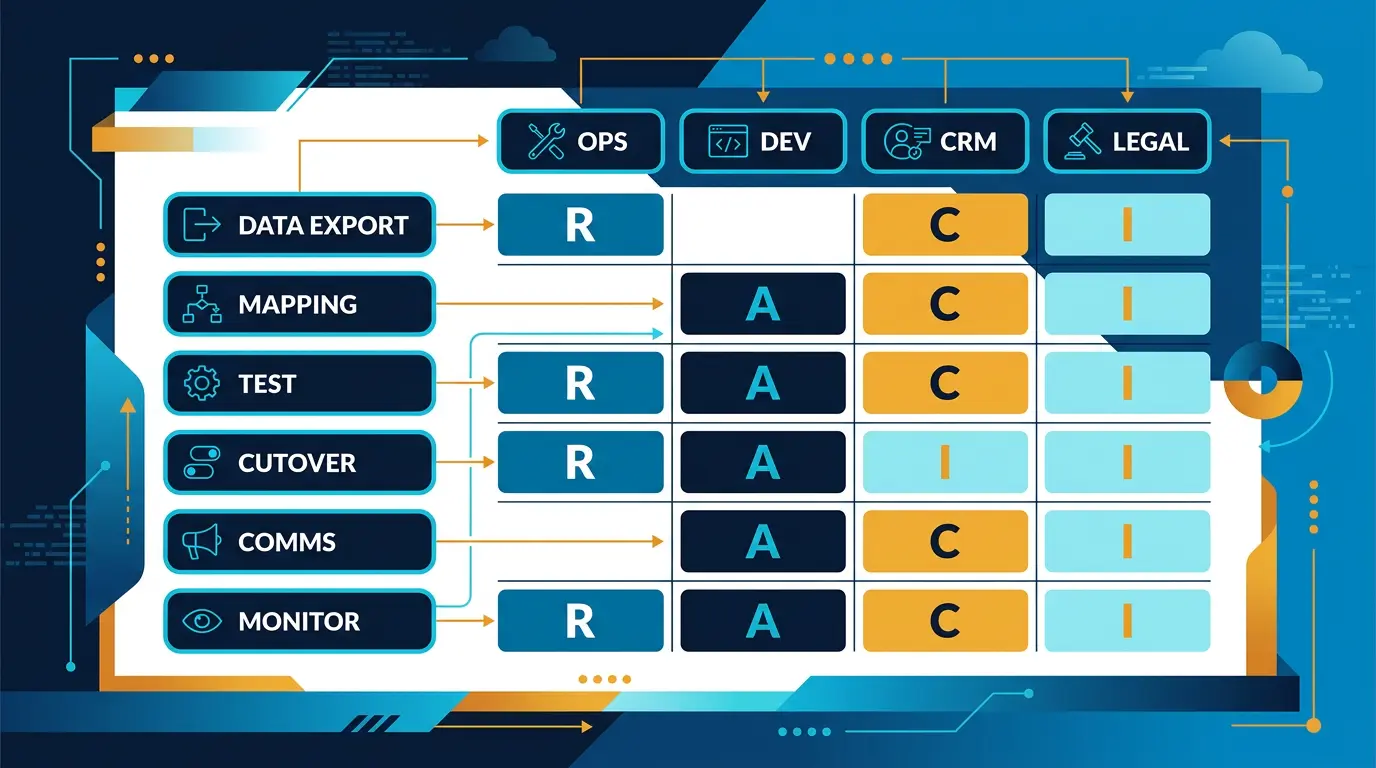
Migration Execution
Big Bang Migration vs. Gradual Migration
Big bang: Shut down old platform, migrate everything, launch new platform. 1-2 days of downtime.
Pros:
- Faster overall
- Fewer complications
- Clear cutover point
Cons:
- Hours of downtime makes users angry
- If something breaks, users are affected immediately
- Risky
Gradual: Run both platforms simultaneously. Migrate users in batches. Phase old platform out over weeks.
Pros:
- Zero downtime
- Can test with real user traffic
- Easy to rollback if issues arise
- Less risky
Cons:
- Takes longer (4-8 weeks)
- More complex operations
- Must keep both systems in sync
Recommendation: Use gradual migration for platforms with 10,000+ users. Big bang only for small platforms where hours of downtime is acceptable.
Gradual Migration Steps
Phase 1: Dual write (Weeks 1-2)
- Run both old and new platform
- Write operations (new swipes, messages) go to BOTH platforms
- Users still use old platform for everything
- Verify data is writing correctly to both
Phase 2: Staged user migration (Weeks 3-6)
- Migrate 10% of users to new platform
- Those users use new platform for all features
- Remaining 90% use old platform
- Monitor for issues, fix bugs
- Migrate next batch (25% total)
- Repeat until 100% migrated
Phase 3: Validation and cutover (Week 7)
- All users on new platform
- Run old and new platform in parallel for 2-4 weeks
- Verify no data discrepancies
- Shut down old platform
- Monitor new platform closely
Handling Failed Migrations
If migration goes wrong, fallback plan:
- Route all traffic back to old platform
- Restore old platform from backup
- Identify what went wrong
- Fix issues in new platform on staging
- Plan second migration attempt (after 1-2 weeks of fixes)
This is why big bang migrations are risky. Rollback is fast with gradual migration. With big bang, rollback affects thousands of users simultaneously.
Post-Migration Verification
First 24 Hours
Monitor closely:
- Are users able to login?
- Are swipes working?
- Are matches working?
- Are messages sending?
- Is payment processing working?
- Is performance acceptable?
- Are error rates normal?
Have entire team on standby. Fix issues immediately.
First Week
- Monitor error logs for new error patterns
- Monitor database performance
- Track user complaints in support queue
- Monitor churn (are users leaving)
Expect 5-10% of users to experience issues. This is normal. Most issues are resolved quickly.
First Month
- Verify all features working as expected
- Verify performance is good or better than old platform
- Verify data integrity over time (random spot checks)
- Monitor for security issues
- Collect user feedback
User Communication Strategy
Communication is critical. Users hate surprises.
!Platform migration timeline and phased execution strategy *Platform migration timeline and phased execution strategy*
3 Months Before
Announce migration:
- Blog post or email: "We're upgrading to a new and improved platform in [X months]. Here's what's changing and why."
- Honest about improvements (faster, new features, better matching)
- Honest about risks (potential downtime, need to reset password)
1 Month Before
Detailed communication:
- What's changing (new features available after migration)
- Timeline (migration happening on [specific date])
- What users need to do (may need to reset password)
- FAQ addressing common concerns
2 Weeks Before
In-app banner: "We're upgrading to a new platform on [date]. The transition should be seamless for you. Please reach out if you have questions."
Make it easy to contact support.
Day Before
Final reminder: "Tomorrow we're launching a new and improved version of our platform. Thanks for being patient during this transition."
Day Of
Status updates every 2-4 hours:
- "Migration starting at 2 PM"
- "50% of users migrated successfully"
- "100% migrated, testing payment processing"
- "All systems operational, enjoy the new platform"
After Migration
Follow-up:
- Thank you email for patience
- Highlight new features available
- Ask for feedback
- Offer support for any issues
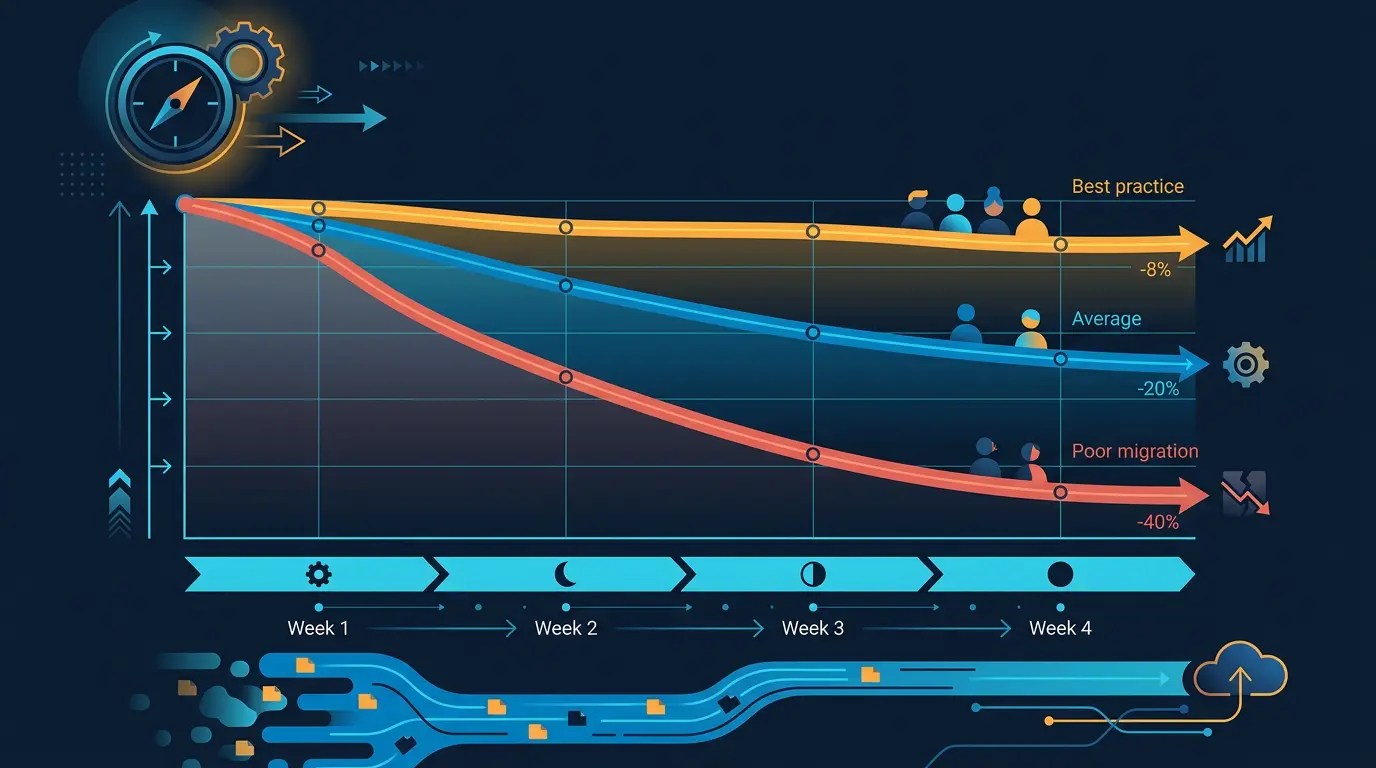
Managing User Churn
Expect user loss during migration. Minimize it with good planning.
Why Users Churn During Migration
- Downtime frustration (can't use platform for hours)
- Changed UI (users confused by new interface)
- Bugs (new platform has issues old didn't)
- Lost connections (users worry their matches disappeared)
- Password reset friction (users forget new password)
Churn Rates by Migration Quality
Well-planned migration: 3-8% churn (users who were leaving anyway) Okay migration: 10-15% churn Poor migration: 25-40% churn (some platforms never recover)
Tactics to Reduce Churn
- Minimize downtime (use gradual migration)
- Clear communication (explain what's happening)
- Smooth onboarding on new platform (guide users through new interface)
- Quick issue resolution (fix bugs fast)
- Incentivize retention (offer premium access, or double matches for 1 month)
- Win-back campaigns (re-engage churned users 2 weeks post-migration)
Win-Back Campaign
Target users who were active before migration but inactive after:
- Email: "We've migrated to a new platform with better matching. Try again, and we'll give you 100 free swipes."
- In-app: Show notification with special offer
- Timing: Send 1-2 weeks after migration
Win back 15-25% of users who would have churned otherwise.
Common Migration Mistakes
Mistake 1: Underestimating Timeline
Project plan says 2 months. Actually takes 6 months. Users get frustrated by delays.
Reality: Migrations take 30-50% longer than estimated.
Fix: Add 50% buffer to estimates. If you think 4 weeks, plan for 6 weeks.
Mistake 2: Poor Communication with Users
Users hear rumors platform is shutting down. They abandon platform. When it reappears, they've moved on.
Fix: Communicate clearly and frequently. Explain why you're migrating. Be honest about timeline and risks.
Mistake 3: Not Testing Thoroughly
Launch new platform. Discover payment processing is broken. Lose 3 days to fix. Users are angry.
Fix: Test everything on staging before going live. Test with real user data, real transactions.
Mistake 4: Inadequate Database Validation
Migrate data. Users report missing matches. Discover 5% of data didn't transfer correctly.
Fix: Run validation tests before declaring success. Count everything. Spot-check randomly.
Mistake 5: Losing Message History
Users care about message history with matches. New platform doesn't have old messages. Users churn.
Fix: Migrate ALL message history. Users want to see conversation continuity.
Mistake 6: Changing Too Much
Migrate to new platform AND redesign entire UI AND add 10 new features. Users are confused.
Fix: Migration is major change already. Minimize other changes. Launch UI redesign 2 weeks after migration is stable.
Mistake 7: Insufficient Support
Support team gets overwhelmed with migration questions and bugs. Wait times spike. Complaints multiply.
Fix: Increase support staff during migration. Have 24/7 coverage if possible. Create FAQ addressing 90% of issues.
Mistake 8: Not Having Rollback Plan
Something breaks. You have no plan to recover. Data is lost. Platform is down for days.
Fix: Have detailed rollback procedures. Practice them on staging. Keep backups. Have disaster recovery plan.
*Caption: Migration execution timeline showing big bang versus gradual migration approaches with dual-write, staged user migration, and validation phases.*
Key Takeaways
- Plan migrations 6 months in advance. They're complex and take longer than expected.
- Use gradual migration (both platforms running simultaneously) for platforms with 10k+ users. Minimizes downtime risk and user churn.
- Thoroughly validate data before and after migration. Count everything. Spot-check randomly. Verify integrity.
- Communicate clearly with users. Explain why, when, and what's changing. Reduce fear and speculation.
- Prepare for 5-15% user churn. Have win-back campaigns ready to re-engage users.
- Don't change anything else during migration. New features, UI redesigns, and other major changes should wait 2-4 weeks.
- Have rollback plan and practice it. If migration fails, you need to recover fast.
- Increase support staff during migration. Users will have more questions and issues.
- Migrate all message history and match data. Users care about conversation continuity.
- Monitor closely first month. Be ready to fix issues immediately.
Planning Your Platform Migration
Understand all available platform options before choosing to migrate. Review essential features to ensure your new platform has what you need. And plan for identity verification continuity during the transition.
See our guide on Dating App Development Cost for cost implications of migration approaches.
Thinking of replatforming? DatingPartners has migrated 100+ sites with bespoke ETL. Talk to us.
Visit DatingPartners.com →