
What is a Dating CRM?
A dating CRM (Customer Relationship Management system) is the command center for your platform. It's where your team manages users, content, payments, customer support, and all operational metrics.
Think of it as the inverse of the user-facing app. If the app is where users discover and match, the CRM is where your staff manages everything behind the scenes.
Most dating platforms spend 20-30% of development resources building the CRM. Many operators underestimate this. A poorly designed CRM creates operational chaos. Your team spends hours manually managing tasks that should be automated.
Key users of the CRM:
- Administrators (full access, system configuration)
- Moderators (review reports, deactivate users, manage content)
- Support team (handle customer inquiries, process refunds)
- Analytics team (analyze metrics, identify trends)
- Payment operations (manage subscriptions, refunds, disputes)
User Management Tools
This is the most frequently used CRM component.
User Search and Lookup
Must allow searching by:
- Email address
- Username
- Phone number
- User ID (internal system ID)
- Date joined
- Last login
- Premium/free status
- Verification status
- Geographic location
Technical implementation: Full-text search with indexing. Searching across millions of users should return results in <500ms. Don't force users to scroll through 10,000 results - implement pagination or filtering.
Search results should display basic user info at a glance: name, age, join date, location, account status, premium status, verification status.
User Profile and Account Management
Once you find a user, you need to view and edit their account.
Viewing capabilities:
- Full profile information (photos, bio, interests)
- Account settings (email, phone, preferences)
- Subscription status and billing history
- Verification status (photo verified, age verified, ID verified)
- Login history (when they logged in, from what IP address)
- Device history (what phones/browsers they've used)
- Payment methods on file
- Support tickets associated with this user
- Reported content from this user
- Reports against this user
- Ban/flag status
Editing capabilities:
- Reset password (for customer support)
- Change email address (if user lost access)
- Refund a transaction (if user was charged incorrectly)
- Remove or move profile photos (if they violate policy)
- Manually verify or unverify account
- Add or remove premium features
- Flag account for review
- Deactivate account
- Permanently ban account
Audit trail: Every action taken on a user account (by admin staff) should be logged. Who made the change, when, and what was changed. This is critical for legal disputes.
Account Deactivation vs. Permanent Ban
Deactivation: Account is hidden from discovery but can be reactivated. User data is preserved. Permanent ban: Account is deleted or marked as permanently unavailable. Used for serious violations only.
Deactivation is used for:
- User requested deletion
- Inactive accounts (no login for 6+ months)
- Suspicious behavior (mass swiping, potential bot)
Permanent ban is used for:
- Harassment or hate speech
- Sexual exploitation or CSAM
- Payment fraud
- Multiple policy violations after deactivation warning
Implement both. Some users just need a timeout. Others need permanent removal.
Bulk User Management
Tools for handling multiple users at once:
- Bulk deactivation (deactivate all inactive users from last 12 months)
- Bulk email sending (notify users of policy changes)
- Bulk data export (export user list for analysis)
- Bulk payment refunds (refund group of disputed transactions)
- Bulk verification status updates
- Bulk feature changes (add premium feature to cohort of users)
Use cases:
- Deactivate all accounts that didn't login in 2026
- Email all users about new safety policy
- Identify and remove accounts from specific geographic region (if operating in that region becomes illegal)
- Refund all Apple Pay transactions from specific date range (if security issue discovered)
Safety requirement: Bulk operations must require confirmation and leave audit trail. Don't allow anyone to accidentally deactivate 100,000 users.
User Segmentation
Ability to segment users for targeted actions:
- By age, gender, location
- By registration date
- By premium status
- By last login date
- By verification status
- By device type
- By geographic location
Segmentation is useful for:
- Targeted email campaigns ("We're running a special for users in New York")
- A/B testing (test new feature with 10% of users)
- Churn prediction (identify users likely to leave, offer incentives)
- Regional policy changes (if platform becomes unavailable in a country)
Content Moderation System
This is the busiest part of your CRM. Content moderation is constant work.
Moderation Queue
A queue shows all user reports waiting for review.
For each report, display:
- Who reported it (user reporting the content)
- Who created the content (user being reported)
- What was reported (photo, message, profile text)
- Report reason (harassment, fake profile, inappropriate content, etc.)
- Report date and time
- The actual content (thumbnail of photo, screenshot of message, etc.)
- Report status (new, in review, resolved)
Moderators need to quickly review and decide: approve (no violation), reject (violation found).
If violation found, actions available:
- Remove photo from platform
- Deactivate user temporarily (24-72 hour timeout)
- Permanently ban user
- Flag account for manual review
- Contact user (notify them of violation)
- Escalate to legal team (for serious violations like CSAM)
Metrics to track:
- Average resolution time (how long before report is addressed)
- Moderator productivity (reports reviewed per hour)
- False positive rate (reports incorrectly marked as violations)
- Appeal rate (users contesting moderation decision)
Automated Content Detection
Manual moderation is expensive. Use tools to pre-screen content.
Available tools:
- Image classification (Crisp, Sightengine) - detects explicit/nude images
- Text classification (OpenAI API, Perspective API) - detects harassment, hate speech
- Phone number detection - detects users sharing contact info (trying to move off platform)
- URL detection - detects users sharing suspicious links
- Bot detection - identifies patterns of suspicious behavior
Most tools have 90-98% accuracy. The remaining 2-10% require human review. This still reduces moderation workload by 80-90%.
Cost: $500-$5,000/month depending on volume.
User Appeals
Users can appeal moderation decisions. Someone's photo was removed but they believe it's appropriate.
Appeal process:
- User submits appeal with explanation
- Different moderator reviews appeal
- Moderator approves (restore content) or denies (upholds original decision)
- User is notified of decision
Track appeals to identify systemic issues. If 20% of appeals are approved, your moderators may be too aggressive. Retrain.
Safety Briefing for New Users
Automated messaging educates new users on community standards.
Display during signup or in a banner on first login:
- What behaviors are not tolerated (harassment, exploitation, hate speech)
- What content violates policy (explicit photos, messages soliciting payment)
- What happens if they violate (content removed, account deactivated, permanent ban)
- How to report violations (dedicated report button)
- Resources for help (hotline for harassment)
Users who see this briefing are significantly less likely to violate policy (20-30% reduction in violations).
Customer Support and Ticketing
Your support team needs tools to help users.
Ticket Management System
When a user contacts support, create a ticket.
Ticket should include:
- Ticket ID (for user reference)
- User name and ID
- Subject (why they're contacting support)
- Description (their question or issue)
- Category (billing, account access, features, safety, other)
- Priority (low, medium, high, urgent)
- Status (new, in progress, waiting on user, resolved)
- Assigned agent (if assigned to a specific support person)
- Creation date
- Last updated date
- Resolution date
Common Support Issues and Solutions
Typical support tickets for dating platforms:
| Issue | Frequency | Solution |
|---|---|---|
| Can't login (forgot password) | 25% | Reset password link sent via email. Verify email, send reset link. |
| "I was charged and didn't authorize it" | 20% | Review transaction. If unauthorized, issue refund. If authorized, explain charge. |
| "Account was deactivated / banned" | 15% | Review reason for deactivation. If error, reactivate. If warranted, explain policy. |
| "My matches disappeared" | 12% | User unmatched or other user deleted. Clarify difference between unmatch and deletion. |
| "Someone is harassing me" | 10% | Block user. Escalate to moderation if serious. |
| "Bug: feature not working" | 8% | Troubleshoot technical issue. May require dev team investigation. |
| "Feature request" | 6% | Log request. Thank user. Communicate decision later. |
| "Payment method declined" | 4% | Help user update payment method. Try charging again. |
*Caption: Breakdown of common support issues showing frequency distribution and recommended resolutions for each ticket type.*
Template Responses
Pre-written responses for common issues. Support agent selects template, personalizes if needed, sends.
Example template: "Can't Login" "Hi [Name],
I understand you're having trouble logging in. Here's how to reset your password:
- Go to the login screen
- Click 'Forgot Password'
- Enter your email address
- Check your email for the password reset link
- Click the link and create a new password
If you're still having trouble, please reply and we'll help further.
Thanks, [Support Team]"
Templates save time and ensure consistent messaging.
Response Time SLAs
Set expectations for response times:
- Urgent (account compromised, payment fraud): 2 hours
- High (can't login, billing issue): 8 hours
- Medium (feature question): 24 hours
- Low (feature request): 72 hours
Track whether your team meets SLAs. Missing targets indicates you need to hire more support staff.
User Satisfaction Rating
After resolving a ticket, ask user: "Was this issue resolved?" (Yes/No) and optionally "Rate your support experience" (1-5 stars).
Track this metric. If <60% of tickets are marked resolved, your support process isn't working.
Analytics and Reporting Dashboards
Data-driven decisions require dashboards. Key metrics to track:
User Metrics
- Total registered users (all-time)
- Monthly active users (logged in last 30 days)
- Daily active users
- New user growth rate (new signups per day)
- User retention (% of users who return 7 days later, 30 days later, etc.)
- Churn rate (% of users who become inactive)
- Users by age, gender, location
- Verification rate (% of users with verified photos or ID)
Engagement Metrics
- Average swipes per user per day
- Match rate (% of swipes that result in mutual likes)
- Messages per user per day
- Conversation continuation (% of first messages that get response)
- Video call attempts
- Premium feature usage (% of users accessing premium features)
Monetization Metrics
- Monthly recurring revenue (MRR)
- Average revenue per user ()
- Lifetime value () - total revenue from average user over their lifetime
- Conversion rate (% of free users who convert to premium)
- Refund rate (% of transactions refunded)
- Payment processor fees (% of revenue lost to fees)
- Paywall effectiveness (where users abandon, how many proceed past premium screen)
Cohort Analysis
Compare different groups of users:
- Users who joined in January vs. February vs. March (do newer users behave differently?)
- Users from different geographic regions (do people in Boston use differently than people in Los Angeles?)
- Users who verified ID vs. users who didn't (do verified users engage differently?)
Cohort analysis reveals patterns. Maybe users from one region churn faster, indicating a product issue.
Real-Time Dashboards
Executive dashboard showing real-time metrics:
- Users online right now
- Matches happening right now
- Messages being sent per minute
- Revenue per hour
- Support tickets waiting
Real-time dashboards create urgency and help identify immediate issues. If matches drop by 50% in one hour, something is broken.
Payment and Revenue Management
Financial operations are critical to profitability.
Payment Status Overview
Dashboard showing:
- Total revenue this month (MRR)
- Revenue compared to last month (growth %)
- Payment processor fees deducted
- Pending payouts
- Refunds issued this month
- Chargebacks and disputes
Subscription Management
For users with recurring subscriptions:
- View all active subscriptions
- Pause/resume subscriptions
- Refund subscription charge
- Update payment method on file
- View subscription history
- Calculate lifetime value
Refund and Chargeback Management
Refund requests:
- User requested refund
- Admin decided refund was warranted
- Refund amount and reason documented
- Refund processed to original payment method
- Audit trail created
Chargebacks (user's bank disputed payment):
- Payment processor notified you of
- You have 7-10 days to respond with evidence
- Evidence: receipt, user account confirmation, etc.
- Submit response to payment processor
- Dispute is resolved (chargeback won or lost)
- Fee charged by processor (typically $15-25 per dispute)
If your chargeback rate exceeds 1%, payment processors may close your account. Manage this closely.
Tax Reporting
Depending on jurisdiction, you may need to report:
- Gross revenue
- Refunds issued
- Payment processor fees
- Sales tax collected and remitted
- 1099s for contractors
Automate tax reporting. Most payment processors provide export-ready tax reports.
Communication Tools
Reaching your users efficiently.
!Dating support ticket types and frequency distribution *Dating support ticket types and frequency distribution*
Email Campaigns
Send targeted emails to user segments:
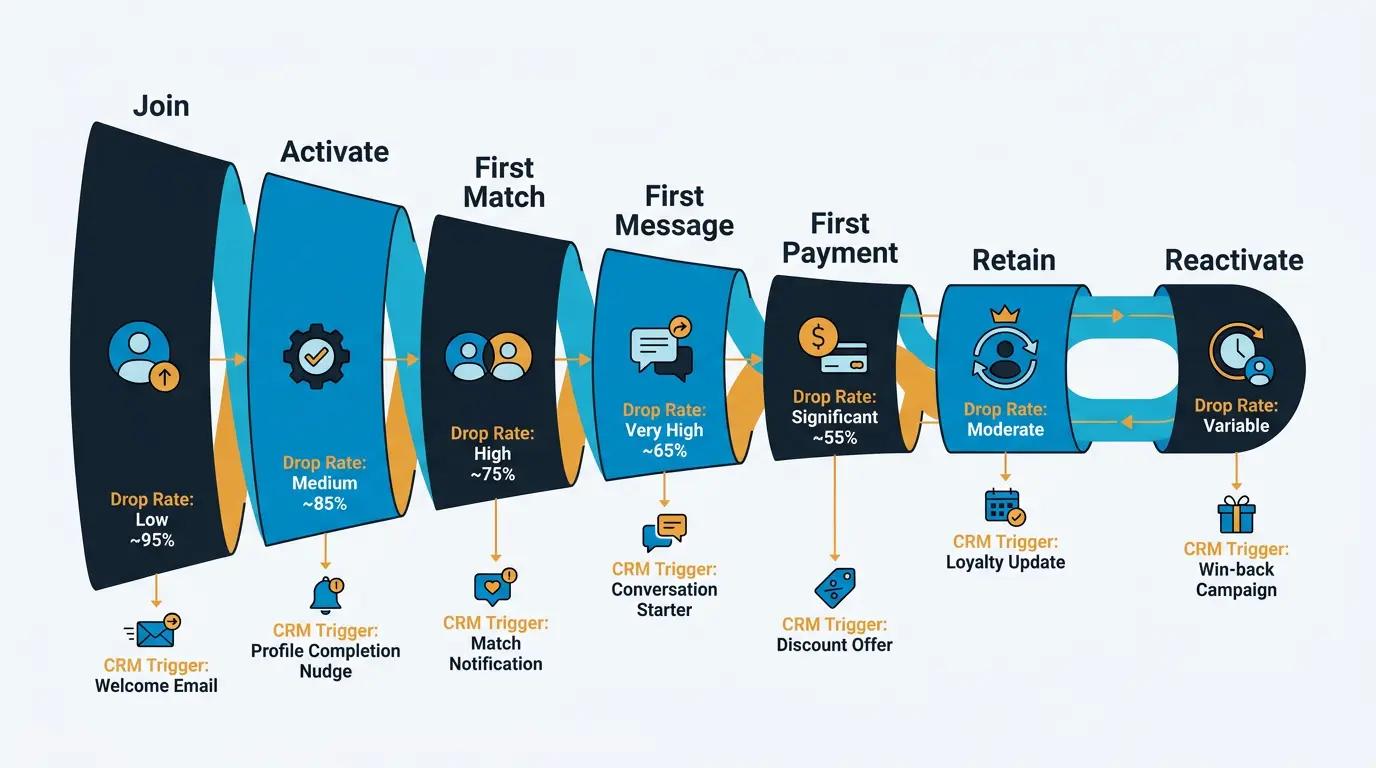
- Onboarding emails (welcome, encourage profile completion)
- Engagement emails ("Someone liked you")
- Retention emails (re-engagement campaigns for inactive users)
- Feature announcements (new features available)
- Policy updates (important changes users need to know)
- Promotional emails (special offers)
Email platforms: Mailchimp, Klaviyo, or SendGrid.
Template-based system with personalization (insert user's name, show their recent matches).
Track metrics: open rate, click rate, conversion rate.
Push Notifications
In-app notifications are more effective than email.
Notification types:
- Match notifications ("Someone liked you")
- Message notifications ("You have a new message")
- Feature announcements
- Promotional notifications (special offer ending soon)
- Win-back notifications (re-engagement for inactive users)
Push notification platform: Firebase Cloud Messaging (Google), or third-party services like OneSignal.
Timing: Send notifications when user is likely to be active (based on their usage patterns).
Frequency cap: Don't overwhelm users. Most platforms send 1-3 notifications per day maximum.
In-App Messaging
Banners and popups within the app:
- New feature notification (show tutorial on new feature)
- Premium upsell (suggest premium if user has reached message limit)
- Safety reminder (important policy update)
Triggered messaging: Show notification when user meets specific condition (reached 5 matches, been inactive 3 days, etc.).
Security and Admin Controls
Protecting your platform and data.
Admin Access Control
Different permission levels:
- Super Admin (full system access)
- Admin (user management, moderation, analytics)
- Moderator (view reports, deactivate users)
- Support (handle support tickets, process refunds)
- Analyst (view analytics only, no modification capabilities)
Two-factor authentication required for all admin accounts.
Audit Logging
Log all admin actions:
- Who logged in and when
- What actions they performed (deleted user, modified payment, etc.)
- When actions occurred
- IP address they logged in from
- Any sensitive data accessed
Audit logs are critical for legal disputes and security investigations.
Backup and Disaster Recovery
Regular backups of:
- User data (profiles, photos, messages)
- Payment data (transaction history, refunds)
- Admin settings
- Database
Backup frequency: Daily for production systems.
Disaster recovery plan: How to restore data if servers fail.
Test recovery quarterly: Actually run through restoration process to ensure backups work.
CRM Tool Comparison
Popular options for dating platform CRMs:
| Tool | Best For | Cost | Learning Curve |
|---|---|---|---|
| Custom-built (in-house) | Full control, niche features | $50k-$200k dev | High |
| Supabase + custom UI | Rapid deployment, indie operators | $200-$500/mo | Moderate |
| Strapi (headless CMS) | Content management, blog, CRM hybrid | $300-$1000/mo | Moderate |
| Xano (no-code platform) | Non-technical operators | $500-$3000/mo | Low |
| Firebase Admin Console | Basic user/auth management | $100-$500/mo | Low |
| Shopify (modified) | If operating as marketplace | $300-$2000/mo | High |
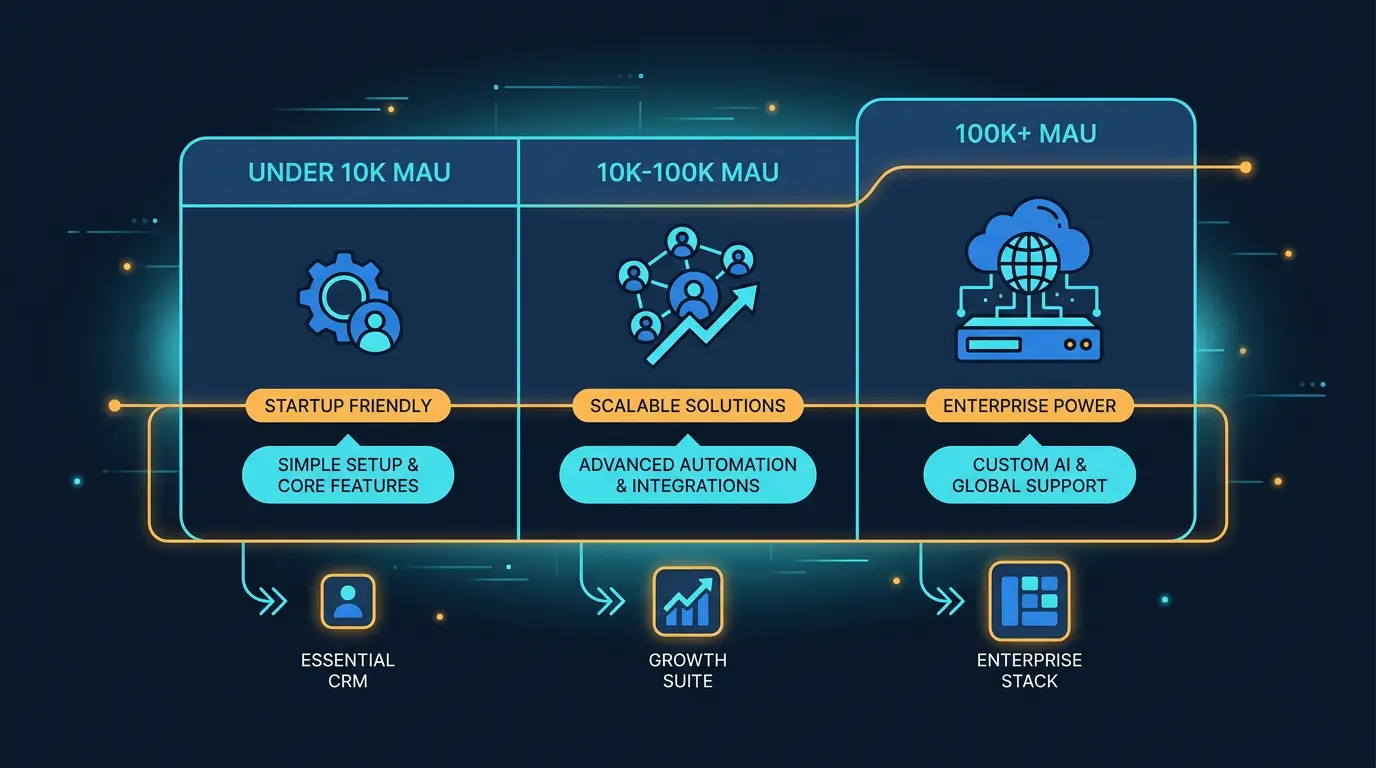
Most dating platforms build custom CRM. Off-the-shelf solutions (Salesforce, HubSpot) weren't designed for dating and require heavy customization.
Key Takeaways
- A dating CRM is as important as the user-facing app. Budget 20-30% of development resources for backend tooling.
- User management tools must allow search, profile viewing, deactivation, and bulk operations. These are used daily by your team.
- Content moderation is constant work. Automate with AI tools (image and text classification) to reduce manual workload by 80-90%.
- Customer support tickets need categorization, SLA tracking, and template responses to handle volume efficiently.
- Analytics dashboards must show user growth, engagement metrics, and revenue metrics. Real-time dashboards help catch immediate issues.
- Payment management requires tracking refunds, chargebacks, and subscription status. Chargebacks above 1% risk processor account closure.
- Communication tools (email, push, in-app messaging) are essential for user engagement and retention.
- Admin security is critical - two-factor authentication, audit logging, and permission levels prevent abuse and insider threats.
- Most dating platforms build custom CRMs because off-the-shelf tools aren't designed for dating operations.
- Good CRM design dramatically improves operational efficiency. Poor CRM design creates chaos and management nightmares.
Implementing CRM Systems
Select platforms with strong CRM tools. Implement identity verification to improve member quality. And use your CRM insights to optimize your platform features.
See our guide on Dating Site Admin Panels: What to Look For for more operator-focused considerations.
DatingPartners ships with Fortitude Send integration and lifecycle templates baked in. Skip the setup.
Visit DatingPartners.com →